![[ AV Educate ]](http://images.squarespace-cdn.com/content/v1/65b8078755ddd303f05675d7/db23e407-0671-4a73-bd96-304f51d3176c/SOCIAL+MEDIA+ICONS.png?format=1500w)
![[ AV Educate ]](http://images.squarespace-cdn.com/content/v1/65b8078755ddd303f05675d7/8f6939e4-c0d0-4eed-8821-4aaa02343b89/SOCIAL+MEDIA+ICONS.png?format=1500w)
Plan the show. Engineer the system. Hand the crew the same plan.
AV Look Book is a free, offline pre-production and show documentation tool for live-event video teams. Build your destinations, presets, I/O, routing and signal flow in one project, then hand your Video Engineers, Show Callers, Producers and crew the look book, cue sheet and drawings they run the show from.
Your show shouldn't live in five different documents.
One change and they stop matching. AV Look Book keeps the show connected: build the destinations, presets, I/O, routing and wiring once, in one project, and every document comes from that one source. Change the show and the look book, the cue sheet and the drawings change with it.
The switcher shouldn't be where you figure out the show.
Building the project makes you answer the questions before load-in. What are the sources? What are the destinations, and at what resolution? What goes to DSM, what goes to AUX? What does each preset do? How is it all connected? Planning the show becomes part of documenting the show.
The things that usually surface in rehearsal surface on your laptop instead:
- Missing sources or destinations
- Wrong resolutions
- Routing problems and missing outputs
- AUX or DSM conflicts
- Connector mistakes
- Looks that don't fit the destination
- Inconsistent preset naming
- Unclear responsibilities between departments
Instead of "change that look with the camera on the left and slides on the right", the team says "change P07". Everyone is looking at the same picture.
Producers and clients see the audience screens, IMAG placement, walk-in and playback looks on the real screen shapes, so "that's not what I thought it would look like" happens in pre-production.
You don't fill in a form. You build the show, and the questions get answered on the way.
Built by a show caller. Speaks the room's language.
Destinations, presets, layers, DSM and AUX, I/O, routing and cabling. Nothing to learn that you don't already say on comms, and one project behind every document.
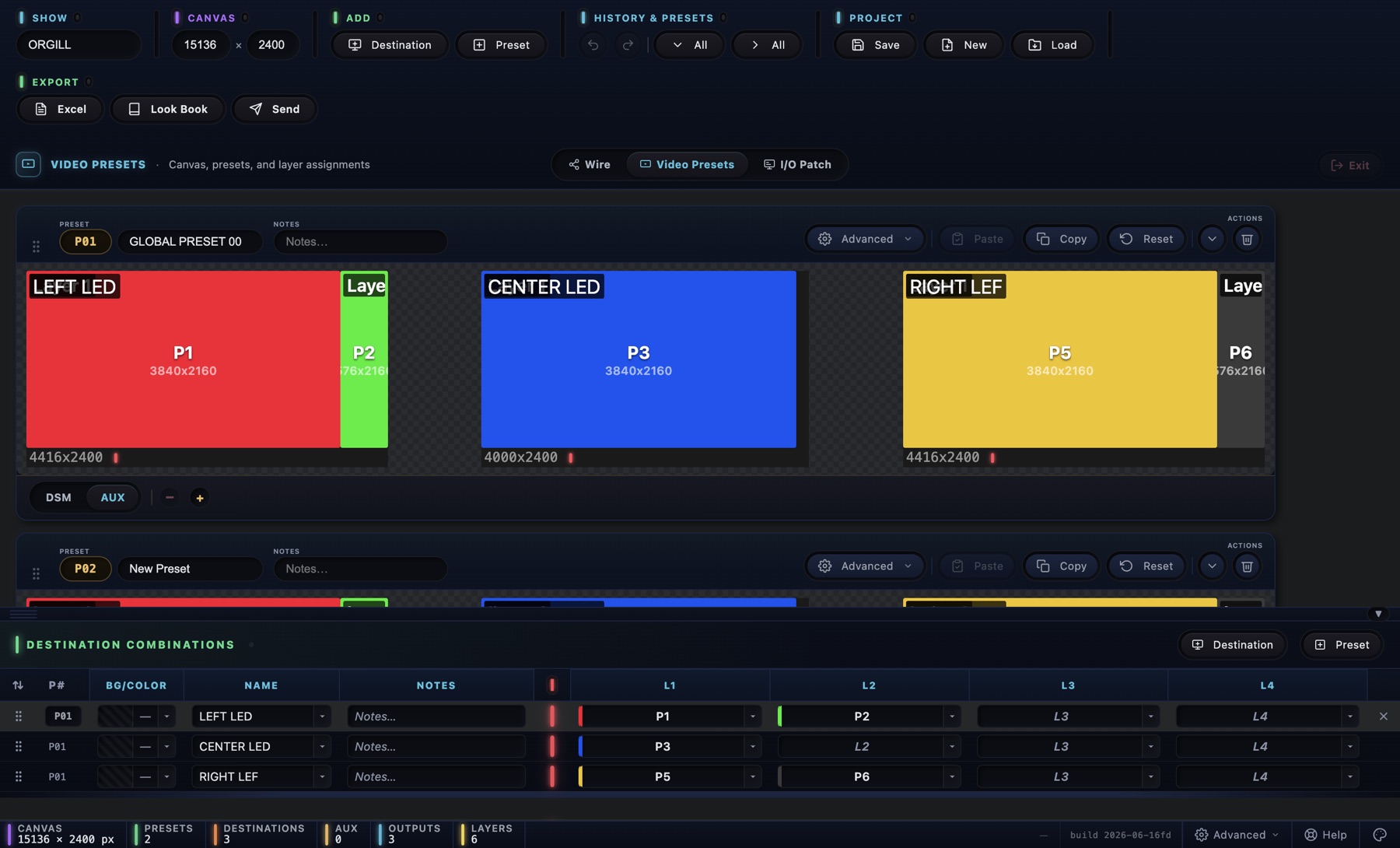
One look per preset, on the real canvas
Add your destinations at their real resolutions, drop sources onto layers, set DSM and AUX outputs, and capture each look as P01, P02, P03, exactly the way you'll call it.
Every preset page in the look book comes straight from this canvas.
Signal flow that prints true
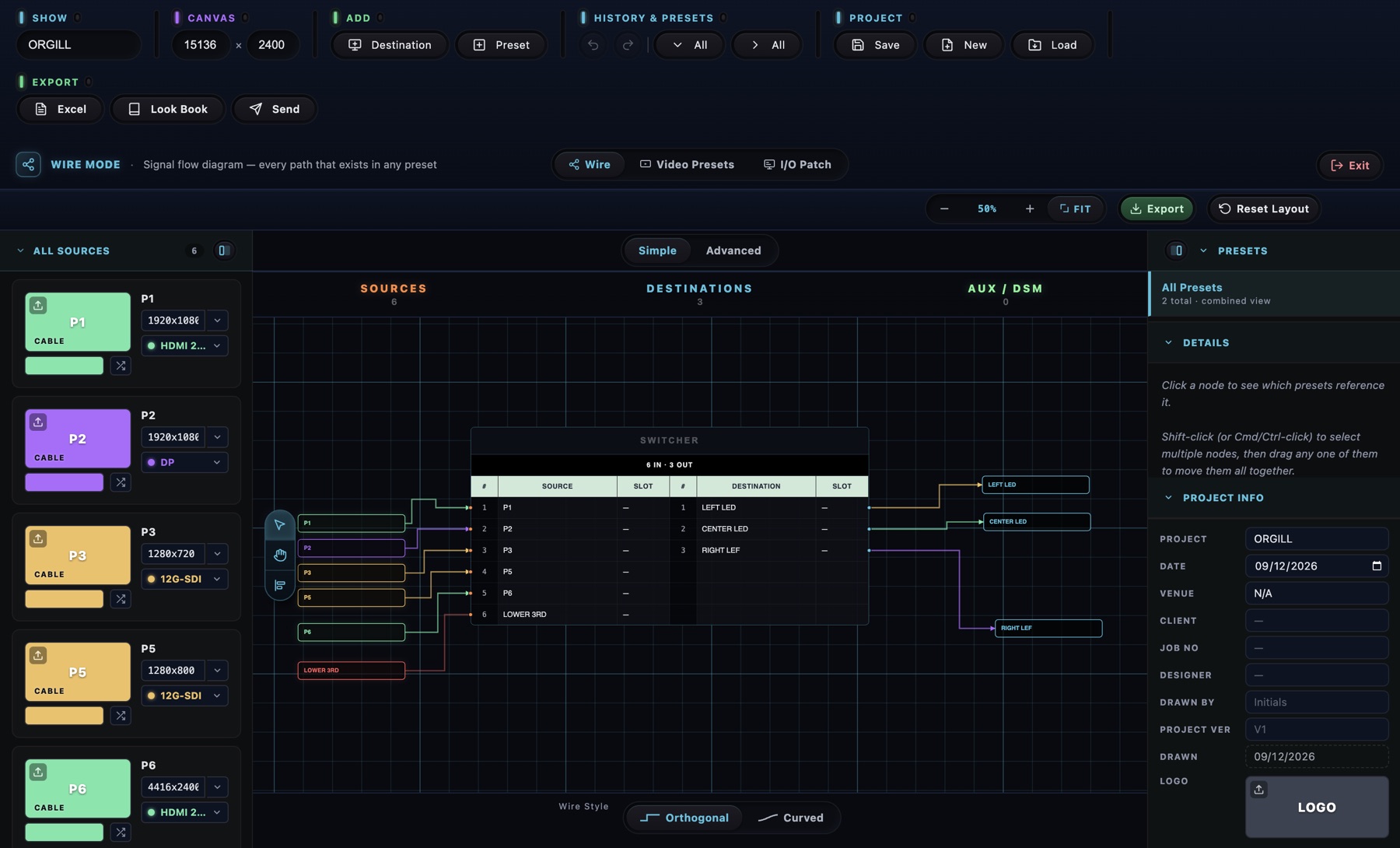
Sources into the switcher, switcher out to every destination and AUX, with cable colours by connector type. HDMI in and SDI out looks like HDMI in and SDI out.
Simple gives you the one-page sheet. Advanced gives you routers, switchers, converters and network switches with port numbers, primary and backup runs, a cable type per output, and multi-page drawings that print from Letter up to ANSI E.
The inventory the engineers ask for
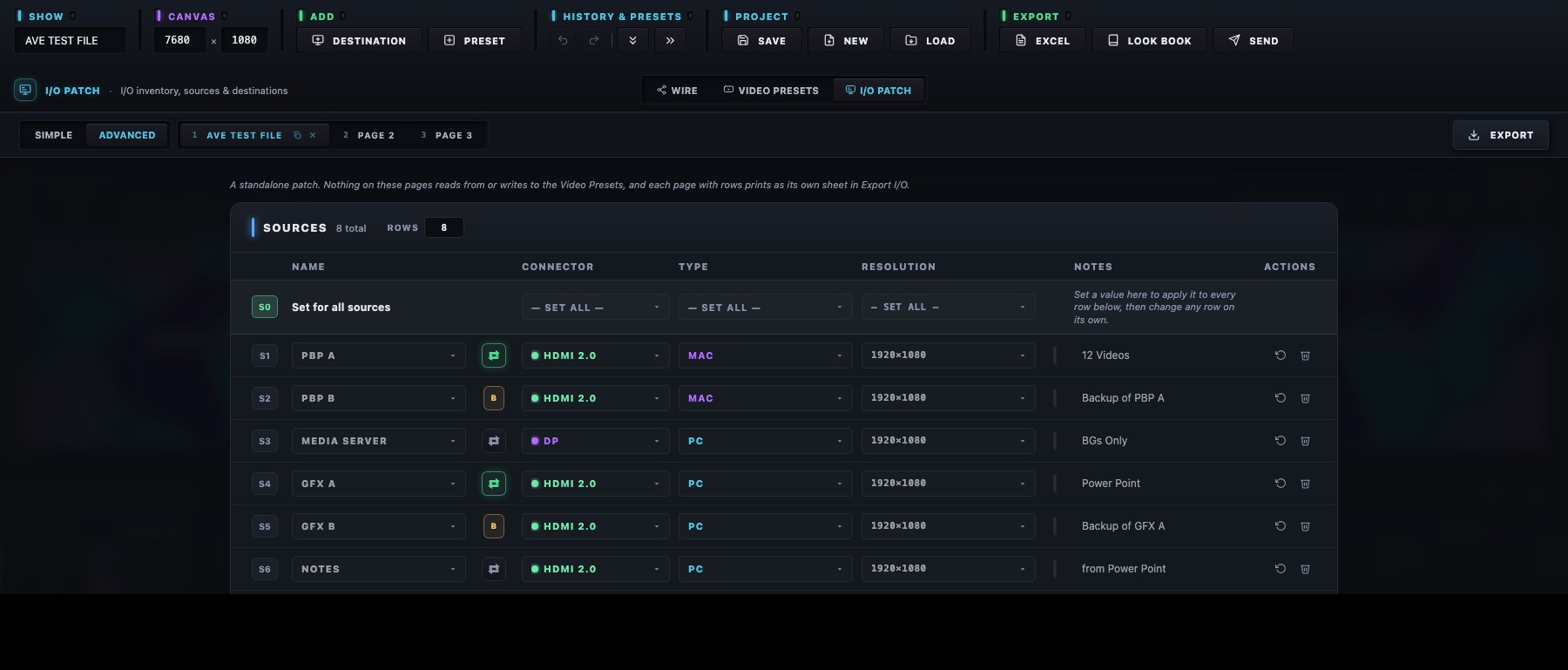
Connector, type, resolution, slot and notes for every source, destination and AUX. Edit it once and it's reflected on the wire diagram, the router tiles and the exports.
Cover, I/O reference, one page per preset with a screen-by-screen breakdown, the wire sheet, and a summary table.
Every preset and destination as a spreadsheet for the switcher op and the stage manager.
PDF, Excel and the show file attached to a new email, with a link so the recipient can open the show themselves.
Three LED walls, walk-in, keynote with a hot-backup laptop, panel, playback. One DSM, one AUX.
Download the packet (ZIP)
show file · Look Book PDF · Excel cue sheet
A 32:9 wall between two projection screens, nominee reels, winner cards with a camera PIP, speeches.
Download the packet (ZIP)
show file · Look Book PDF · Excel cue sheet
Hybrid all-hands, slides with a CEO PIP, a Teams guest, audience Q&A, a recap video, stream out.
Download the packet (ZIP)
show file · Look Book PDF · Excel cue sheet
The same three shows are inside the app under Quick Start, Start from an example. Open one, look around, then Save As to make it yours. The PDF and the cue sheet are what the crew receives; the show file is what the app opens.
One show. Different views for the people who need them.
A Producer asks what the audience sees. A Show Caller asks which preset to call. A Video Engineer asks how it is routed and connected. The operator asks what happens when P07 is called. AV Look Book is the common reference between them.
Your show stays yours.
AV Look Book works on your computer, with your files. Nothing about your show goes anywhere unless you export it or send it.
- Your project files stay on your computer. A show is a single .avlb file you control.
- Works offline. No Internet needed to build the show, no dependence on ballroom Wi-Fi, fine on isolated production networks. When online, the app only checks for a newer version at launch.
- No cloud workspace, no account. Projects are not tied to a login and are not stored in an online workspace.
- No analytics, no AI. The app collects no usage data and sends no project information through AI systems.
- Back it up your way. Copy the file to the show drive, a USB stick, the company server or your approved cloud folder, like the rest of the show.
Companies keep their own software and IT rules, of course. Local, offline operation just means there is a lot less to review.
Graphics/
Playback/
PowerPoint/
Switcher/
Documents/
AV Look Book/
Client Show.avlb
Client Show, Look Book.pdf
Client Show, Cue Sheet.xlsx
Your project is a show file. Back it up like the rest of your show, and it never depends on anyone else's server.
Turn show knowledge into company knowledge.
"John knows how that room works." "Ask Sarah what P08 does." "The engineer who built it isn't here today." Corporate AV runs on freelancers, rotating crews and last-minute substitutions, and the show shouldn't disappear when the engineer goes home.
With the project file, the Day 2 operator, the replacement Show Caller, the Technical Director reviewing the show or the Producer checking the screen layouts all open the same show. No user provisioning, no seats, no passwords, no freelancer account setup, nobody to remove after the show.
Recurring client? Open last year's file, Save As, change what is different. Don't rebuild recurring shows from memory.
Use it with the workflow you already have.
Build it in AV Look Book, share it in the format your crew needs. The PDF look book and the Excel cue sheet go to everyone; the project file goes to anyone with the app. The whole crew does not have to adopt another platform to read the show, and the documentation stays usable outside the app.
The show comes first, not the switcher brand. Plan it the same way whether it ends up running on:
AV Look Book plans and documents the show. It does not control the switcher, and it is not a replacement for Vectorworks, ConnectCAD or AutoCAD: the integrator documents how the system is built, AV Look Book documents how it is being used for this event. If you already speak sources, destinations, presets, AUX and signal flow, you already speak its language.
Straight answers.
Is it really free?
Yes. No trial, no subscription, no seats, no account. AV Educate Inc is a 501(c)(3) nonprofit; AV Look Book is built as a resource for the AV community and funded by donations.
Why do you ask for my email?
It does not create an AV Look Book account, and your projects are not tied to it. AV Educate uses the email for AV Look Book updates and news. Unsubscribe any time.
Does it need the Internet?
No. AV Look Book works fully offline. When it is online, the app checks GitHub for a newer version at launch. Nothing about your show is sent.
Where are my files stored?
On your computer. A show is a single .avlb file that you control, plus an autosave draft in the app's own data folder. Back it up like any show file.
Does AV Educate see my project? Does it upload anything?
No. There is no cloud workspace, no analytics, no telemetry and no AI. The only network traffic is the update check at launch and links you click yourself.
Does it control my switcher?
No. AV Look Book plans and documents the show. Programming stays on the switcher.
Does it replace Vectorworks, ConnectCAD or AutoCAD?
No. Those document how the system is built. AV Look Book documents how the system is being used for this event.
Does it work with my switcher?
It is brand-agnostic. Plan the show whether it ends up on Barco, Analog Way, Pixelhue, Spyder, Ross or something else. The Vocabulary reference in the app maps the terms between them.
Does the whole crew need AV Look Book?
No. Build it in the app, then hand out the PDF look book, the Excel cue sheet or the project file. Anyone with the app opens the file and gets the whole show.
Can I send the project to another engineer?
Yes. Send attaches the PDF, the Excel and the show file to a new email. The file opens on any Mac or Windows machine with the app.
Can I reuse an old show?
Yes. Open last year's file, Save As, change what is different. Or start from one of the example shows in Quick Start.
How do I back up my project?
It is a file. Copy it to the show drive, a USB stick, the company file server or your approved cloud folder, like the rest of the show.
Mac and Windows?
Mac (Apple Silicon and Intel) and Windows 10 / 11. Updates arrive inside the app. The Windows installer installs for the current user and needs no administrator rights.
Why does my computer warn me on first open?
The builds are not signed yet. Apple notarization and a Windows certificate cost money, and donations get us there. Mac: System Settings, Privacy & Security, Open Anyway. Windows: More info, Run anyway. The welcome email has the same steps.
What happens if AV Educate stops developing it?
Your files stay yours and stay readable, and the PDF and Excel exports keep the show usable outside the app.
Build the show before you build the show.
Have an idea? Vote on what we build next.